A question came up in an enterprise enablement session last week that stopped the room. If I build a Copilot agent, attach a knowledge source, and share the agent with two hundred people, have I just given two hundred people access to that data?
The honest answer is: it depends on how the knowledge got into the agent. And the difference is not obvious in the maker’s interface, which is why this is the most common way an internal Copilot agent turns into an oversharing incident.
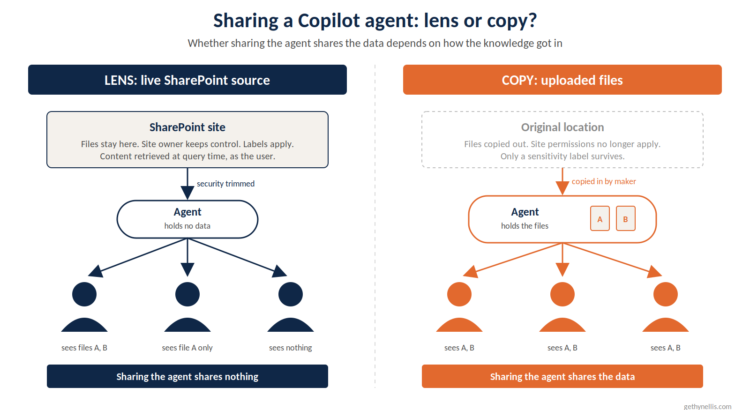
The short version. Copilot agent knowledge source permissions fall into two camps. Live sources like SharePoint are retrieved under each user’s own permissions, so sharing the agent shares nothing. Uploaded files are copied into the agent, so sharing the agent shares the file. Know which camp you are in before you press share.
Camp 1: the agent is a lens
When you point an agent at a SharePoint site, a OneDrive folder, a Graph connector, or Dataverse with user authentication, nothing is copied. Every time a user asks a question, the agent goes and fetches content at that moment, as that user.
Microsoft 365 security trimming applies in full. If the user has no read permission on a file, the agent behaves as though the file does not exist. Sensitivity labels are honoured too, so label-restricted content only surfaces for people the label permits. That is also why users occasionally see a “Connect to continue” prompt: the agent is asking for consent to retrieve on their behalf, because it holds nothing itself.
In this camp, sharing the agent changes nothing about data access. Ten people can use the same agent and get ten different answers, each shaped by what they were already allowed to see. The agent is a lens on data the user already has.
Camp 2: the agent is a copy
Now take the same agent and, instead of pointing it at SharePoint, upload the files directly. Makers do this constantly, and for understandable reasons: no consent prompts, faster grounding, and it works in a demo.
Those files are copied into the agent’s own store and become embedded knowledge. Microsoft’s own documentation is blunt about the consequence: when you share an agent with embedded files, you share the files with everyone who acquires the agent. The only guard left is a sensitivity label. If the file is labelled and a user lacks extract rights, they cannot install the agent. If the file is unlabelled, there is no guard at all.
The same applies to anything reached through a connection the maker configured rather than the user’s own identity. An Azure AI Search index, a connector set to use the maker’s credentials, a Dataverse connection running as the author, a public website. Whatever the maker could see when they built the agent, every user of the agent can now retrieve.
In this camp, the agent is a copy of the data. And the agent’s sharing list has quietly become an access control list.
The table to pin above your desk

| Knowledge source | Whose permissions apply | Does sharing the agent share the data? |
|---|---|---|
| SharePoint or OneDrive (live source) | The user’s | No |
| Graph connectors | The user’s | No |
| Dataverse, user authentication | The user’s | No |
| Uploaded files (embedded) | Nobody’s, beyond the label | Yes |
| Azure AI Search | The maker’s connection | Yes |
| Connectors using maker credentials | The maker’s | Yes |
| Public websites | Not applicable | Yes |
Why this bites harder than classic oversharing
Oversharing in SharePoint has been with us for twenty years. What is new is the wrap here. A file sitting in a badly permissioned library is still a file somebody has to find. A file embedded in an agent is served up, summarised and cross-referenced to anyone who types a question, and the agent will helpfully combine it with other things it knows.
It also inverts who makes the decision. In SharePoint, the site owner controls access. With an embedded file, the agent maker controls access, and most agent makers do not think of themselves as making an access decision. They think they are making a distribution decision. “Who can use my agent” sounds like a marketing question. For anything in Camp 2, it is a data governance question.
I have watched this happen in real tenants. A well-meaning analyst builds an agent over a pricing workbook, uploads the file because the SharePoint connector prompted for consent and they were in a hurry, then shares it with a department that includes contractors. Nobody did anything malicious. The permission model was simply bypassed by a convenience feature.
What to do about it
Three rules, in order of how much trouble they save.
Prefer live sources over uploads. If the content exists in SharePoint, point the agent at SharePoint. You get freshness for free, the site owner keeps control, and every query runs through security trimming and Microsoft’s prompt injection classifiers. Uploads should be the exception, reserved for content that has no proper home and no sensitivity.
Label anything you do upload. A sensitivity label is the only control that survives embedding. If a file is worth uploading into an agent, it is worth labelling first, because the label is the one thing that will stop the wrong person installing the agent.
Treat the sharing list as an ACL. Before an agent with embedded or maker-credentialled knowledge goes beyond a small team, someone other than the maker should look at the audience and ask whether every person on it should be able to read every file inside. If the answer is “probably”, the agent is not ready.
If you run an agent register, and I would argue every organisation with Copilot Studio switched on needs one, add a column for knowledge source type and authentication mode. That column tells you, at a glance, which agents are lenses and which are copies. Agent 365 and Purview’s data security posture tooling exist largely to find the copies after the fact. A register finds them before.
The line that matters
For live sources, the agent is a lens on data the user already has, and sharing is safe by construction. For embedded or maker-credentialled sources, the agent is a copy of the data, and sharing the agent is sharing the data.
Ask which one you have built before you ask who should get it.
Get the data foundations right first
Most agent oversharing incidents trace back to the same root cause: permissions and labelling that were never tidied up before Copilot arrived. That is the first thing I look at in an enablement engagement, because an agent built on a well-governed estate is safe by default and an agent built on a messy one is a risk with a friendly name. If your organisation is rolling out agents beyond a pilot group, have a look at how the AI Enablement Programme approaches data foundations, governance and agent design as one piece of work.
PakarPBN
A Private Blog Network (PBN) is a collection of websites that are controlled by a single individual or organization and used primarily to build backlinks to a “money site” in order to influence its ranking in search engines such as Google. The core idea behind a PBN is based on the importance of backlinks in Google’s ranking algorithm. Since Google views backlinks as signals of authority and trust, some website owners attempt to artificially create these signals through a controlled network of sites.
In a typical PBN setup, the owner acquires expired or aged domains that already have existing authority, backlinks, and history. These domains are rebuilt with new content and hosted separately, often using different IP addresses, hosting providers, themes, and ownership details to make them appear unrelated. Within the content published on these sites, links are strategically placed that point to the main website the owner wants to rank higher. By doing this, the owner attempts to pass link equity (also known as “link juice”) from the PBN sites to the target website.
The purpose of a PBN is to give the impression that the target website is naturally earning links from multiple independent sources. If done effectively, this can temporarily improve keyword rankings, increase organic visibility, and drive more traffic from search results.