Once the security questions were out of the way in the agents lab round table at Microsoft Ignite 2026, the next one came quickly. How many Fabric data agents should we actually build? One for the whole business? One per department? Dozens of small ones?
Start with one Fabric data agent for one group of questions. Pick questions that share trusted data, agreed business definitions and a person who can verify the answers. Prove that the agent can answer them before you add another. If users eventually need one place to ask across several domains, put an orchestrating agent in front of the specialists.
Where a broad agent starts to struggle
Each agent can connect to five data sources
Microsoft documents a maximum of five configured data sources per agent, in any supported combination. A single warehouse or Power BI semantic model can cover many relevant tables or measures. If you need a sixth source to answer questions that genuinely belong together, first check whether a curated warehouse or semantic model can bring the required data together. Microsoft Learn lists the supported sources and the five-source limit.
Overlapping sources make the right answer harder to find
Suppose one source reports booked orders and another reports recognised revenue. Both may be described as ‘sales’, but they answer different questions. They can sit in the same agent if you define and test them explicitly. For ‘What were sales last quarter?’, decide whether the agent should use an agreed default or ask which measure the user means.
Expose the schema objects the agent needs. Give sources clear names and, where supported, add descriptions and representative questions. Before rewriting the instructions, look at the run steps and see which source the agent actually chose. That tells you whether to fix the routing or the query the agent generated. Microsoft’s guidance on data source routing.
Why the org chart is a poor starting point
A finance department covers month-end close, budgeting, supplier payments and payroll costs. Those areas can involve different data, definitions and people who know whether an answer is right. Meanwhile, finance and sales may both need the same governed revenue numbers.
I scope around a question domain. That’s a group of questions that belong together because they draw on related data, use agreed definitions and can be validated by an accountable owner.
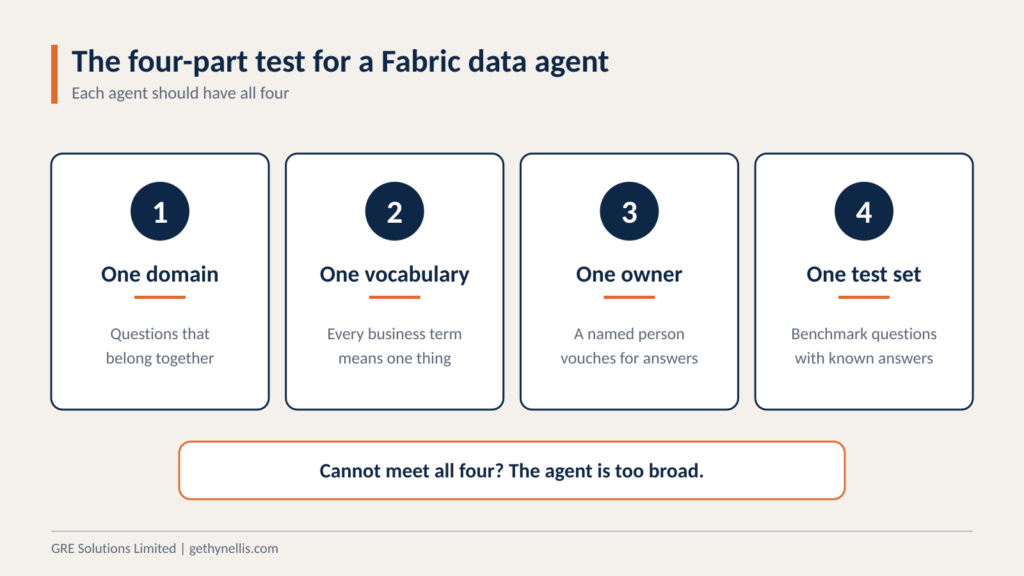
The four-part test for scoping a Fabric data agent
- One domain. A set of questions that belong together, such as sales performance or stock availability.
- One agreed vocabulary. Define the measures people use. Give ambiguous terms a clear default or have the agent ask for clarification.
- One accountable owner. Name the person who can get definitions agreed and sign off the benchmark results.
- One benchmark. Use realistic questions and verified expected answers. Include common wording, ambiguous questions and questions outside the agent’s scope.
If you can’t agree who signs off the answers or what a correct answer looks like, settle that before you expand the agent. It may mean narrowing the domain. It may mean sorting out definitions that were already causing problems in your reports.
When to split an agent
- Definitions keep colliding. The same terms mean different things to different audiences, and users struggle to tell which answer they’ve received.
- Source routing keeps failing. The agent repeatedly picks the wrong source for a class of questions after you’ve tightened the schema and improved the source context.
- Wider coverage makes the existing answers worse. Your benchmark shows a drop when you add another topic.
- Ownership or release decisions have diverged. The two sets of questions need different people to approve changes and verify results.
The opposite problem is an agent for every report or table. If two agents serve the same questions, use the same definitions and have the same owner, test whether one can cover both before maintaining them separately.
Should they be as specific as Copilot agents?
I use the same scoping discipline for both. Give the agent a clear job and test whether it does that job before adding more.
There’s a detail worth knowing when a Fabric data agent uses a Power BI semantic model. Put model-specific AI instructions in Prep for AI on the model. The data agent’s own instructions can guide source selection and response formatting, but they are not passed to the DAX generation tool. If the problem is how DAX interprets a measure or date, start with the semantic model and its Prep for AI settings. Microsoft’s semantic model guidance for Fabric data agents.
Narrow agents, one front door
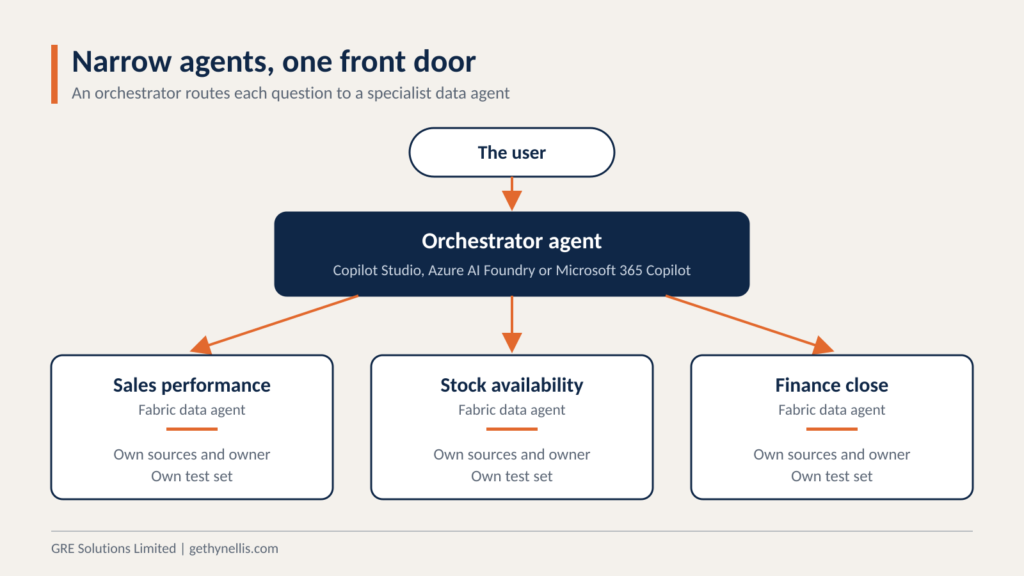
If users need a single place to ask across several domains, you can add multiple published Fabric data agents as tools to one Copilot Studio agent. Describe which questions each specialist should handle so the orchestrator can choose the right one. Decide which credentials each call should use. If answers need to respect each user’s own access, use User authentication and test it with accounts that have different permissions. Microsoft’s guide to using Fabric data agents as tools in Copilot Studio.
Microsoft Foundry also supports adding multiple agents through Fabric IQ, currently in preview. You can publish individual Fabric data agents to the Microsoft 365 Copilot Agent Store, where users can open or mention the agent they want to use. Fabric IQ in Microsoft Foundry and Fabric data agents in Microsoft 365 Copilot.
When you change a specialist, rerun its benchmark and a smaller end-to-end test through the published channel. Check which specialist was called, what answer the user saw and whose permissions were applied. Include a question that could plausibly go to two specialists.
The takeaway
Pick the questions worth answering reliably. Give them an owner and a benchmark. Start with one agent. Prove it. Then build the second when there’s a distinct set of questions worth supporting.
Build a benchmark for your Fabric data agent
I’m running Test It and Prove It: Build a Benchmark for Your Fabric Data Agent on Monday 14 December 2026, 14:30 to 17:30 GMT, live on Microsoft Teams. We’ll build a benchmark question set, use it to find where an agent goes wrong and rerun it to see whether the fixes worked. Book a place on the Fabric data agent workshop.
PakarPBN
A Private Blog Network (PBN) is a collection of websites that are controlled by a single individual or organization and used primarily to build backlinks to a “money site” in order to influence its ranking in search engines such as Google. The core idea behind a PBN is based on the importance of backlinks in Google’s ranking algorithm. Since Google views backlinks as signals of authority and trust, some website owners attempt to artificially create these signals through a controlled network of sites.
In a typical PBN setup, the owner acquires expired or aged domains that already have existing authority, backlinks, and history. These domains are rebuilt with new content and hosted separately, often using different IP addresses, hosting providers, themes, and ownership details to make them appear unrelated. Within the content published on these sites, links are strategically placed that point to the main website the owner wants to rank higher. By doing this, the owner attempts to pass link equity (also known as “link juice”) from the PBN sites to the target website.
The purpose of a PBN is to give the impression that the target website is naturally earning links from multiple independent sources. If done effectively, this can temporarily improve keyword rankings, increase organic visibility, and drive more traffic from search results.