One of the interesting parts of implementing an AI enablement program is seeing how different organizations actually use these tools. Over the last two to three years I’ve been helping organizations in Europe and the United States tackle AI, and in almost every case, the tool in question is Microsoft 365 Copilot. This may be an echo chamber effect, as the nature of my business means I spend most of my time in Microsoft shops, but considering how many of the world’s largest companies run Microsoft enterprise-wide, this is fairly representative.
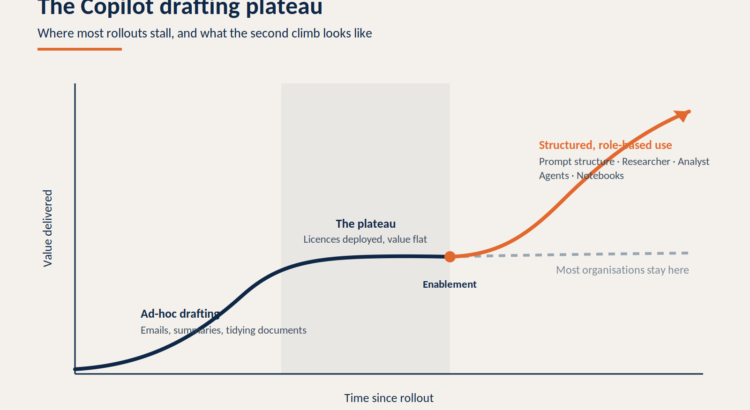
And across all of these organizations, the same pattern emerged. Copilot launched, people used it to structure emails and organize documents, and then adoption plateaued. The license is paid for, the usage dashboard looks great, and there’s nothing to show for productivity gains that could stand the scrutiny of a finance director.
The gap is rarely technology. Most users never ignore Copilot as a drafting assistant. I’m increasingly being asked to deliver workshops that show what’s happening on the other side of the plateau, and they follow a consistent rhythm: quick quality fixes first, then introducing Microsoft 365 Copilot agents and workspaces that transform Copilot from a writing tool into a business tool.
Start with fast quality, not features
The starting point for any worthwhile Copilot workshop is fast quality. Most people don’t get bad results because Copilot is useless; they get poor results because the instructions are too vague. “Write me something about the Q3 numbers” will always produce something general, whatever the underlying model.
Microsoft’s quick guide covers four elements: Goals, Context, Expectations, and Resources. In workshops I teach it as GCSE, Goals, Context, Sources, Expectations, because the familiar acronym sticks in a way that a bullet list never has. Give Copilot a clear task, the background required, the information to be captured, and the output format you expect, and the quality of the response changes immediately.

The structure is simple, but capable of carrying most heavy loads. Everything that follows in this post assumes you’re ready, as agents reinforce the quality of the instructions you give them, in both directions. If you want to dive deeper into prompt structure, I’ve written a book about it, AI That Actually Works, and created a free interactive prompt framework tool that generates structured prompts from your scenarios. There is also a free white paper that can be downloaded.

Researchers: from quick answers to source-cited reports
Researcher is where Copilot begins to move beyond simple chat to meaningful business work. Rather than asking for quick answers, you tell Researchers to investigate topics across web sources and, if permissions allow, the content of your work: files, emails, meetings, and chats. Microsoft positions it as a built-in agent for complex, multi-step research that produces structured, source-cited reports.
The value is not just speed. The goal is that the output can be reviewed, challenged, and reused. A cited report is something you can present to stakeholders; the chat answer is no. In workshops I use Researcher for market research, policy comparisons, competitor reviews, board briefing notes and meeting preparation, and the reaction is always the same: this is the first time the participants have seen Copilot produce something they will actually circulate.
One practical note: Researchers respect your existing consent. This will only display job content that you can already open, which is why data and permission readiness is important before you scale this kind of use. Copilot reveals clearance issues; it didn’t create it.
Analyst: ask better questions about the data you already have
Analyst is the feature that I think will prove most valuable for organizations that want more from the data they already have but don’t have a data analyst available at the time someone needs an answer. You attach data, ask questions in natural language, and Analysts tackle problems iteratively, exploring trends, comparing numbers, and identifying outliers. It can run Python to perform analysis, and you can examine the code it produces and check how it works.
This does not eliminate the need for good data governance or expert review, and I would be skeptical of anyone who claims that. What it really does is lower the barriers to asking better data questions. In the workshops, I run practical exercises with spreadsheets and business data sets, focusing on how to examine outputs and how to generate them. The second skill is the skill that separates beneficial adoption from risky adoption.
Build a personal productivity agency
The most interesting shift at Copilot is the move from using an all-purpose assistant to creating agents shaped around specific tasks, roles, or workflows. Using Agent Builder, anyone with a Copilot license can create agents in natural language, based on selected knowledge sources, with specified instructions and defined goals.
A personal productivity agency might prepare you for weekly meetings, summarize important documents, compile recurring reports, create action lists, or guide you through standard processes that you repeat frequently. The important thing is that the agent is not magic. It requires clear instructions, useful knowledge sources and clear work. In this workshop we design a simple productivity agent from scratch: what instructions it provides, what content it is based on, and how to test whether the output is reliable enough to rely on. It’s that last step that makes most self-built agents fail, and it’s completely fixable.
Copilot Notebook: when the task goes beyond the chat thread
Copilot Notebook finds its place when a task is too important or too long to run in one chat thread. Notebooks give you a focused workspace where you collect files, pages, links, chat, and meeting notes, then ask Copilot questions across that curated material. Context builds over time, rather than evaporating as the conversation rolls on.
This makes Notebooks especially suitable for projects, client work, research, strategy documents, and iterative planning. In those workshops, we set up notebooks for real business tasks: adding the right sources, asking focused questions, and crafting output from a controlled set of information, not whatever the model is trying to achieve. For anyone whose work takes weeks, not minutes, this is a feature that changes the way they use Copilot on a day-to-day basis.
The point of all this
None of these capabilities require new licenses or new technology. Researcher, Analyst, Agent Creator, and Notebook are all included with Microsoft 365 Copilot, but are not used in most tenants when people draft emails.
The organizations that get the real benefit from Copilot are not the ones that have the most licenses. They are the ones who deliberately moved from ad-hoc orchestration to structured, role-based applications: the right structure first, then agents and workspaces that fit each team’s actual work. That’s the sequence covered in my Art of the Possible workshop, and it can be repeated at any organization willing to spend half a day doing it.
Bring this into your organization
If your Copilot rollout has stalled during setup, a structured enablement program is usually the quickest way to get through it. The Art of the Possible Workshop is the entry point: hands-on sessions that show your team what Researchers, Analysts, agents, and Notebooks can do in their real work. See how the AI Enablement Program works, or contact us and we’ll provide a session for your team.
PakarPBN
A Private Blog Network (PBN) is a collection of websites that are controlled by a single individual or organization and used primarily to build backlinks to a “money site” in order to influence its ranking in search engines such as Google. The core idea behind a PBN is based on the importance of backlinks in Google’s ranking algorithm. Since Google views backlinks as signals of authority and trust, some website owners attempt to artificially create these signals through a controlled network of sites.
In a typical PBN setup, the owner acquires expired or aged domains that already have existing authority, backlinks, and history. These domains are rebuilt with new content and hosted separately, often using different IP addresses, hosting providers, themes, and ownership details to make them appear unrelated. Within the content published on these sites, links are strategically placed that point to the main website the owner wants to rank higher. By doing this, the owner attempts to pass link equity (also known as “link juice”) from the PBN sites to the target website.
The purpose of a PBN is to give the impression that the target website is naturally earning links from multiple independent sources. If done effectively, this can temporarily improve keyword rankings, increase organic visibility, and drive more traffic from search results.