Every few months I have a version of the same conversation with clients, usually in regulated industries. It said: “We love Power BI, but the data can’t leave the building. We’ll just run Power BI Report Server instead. Same thing, right?”
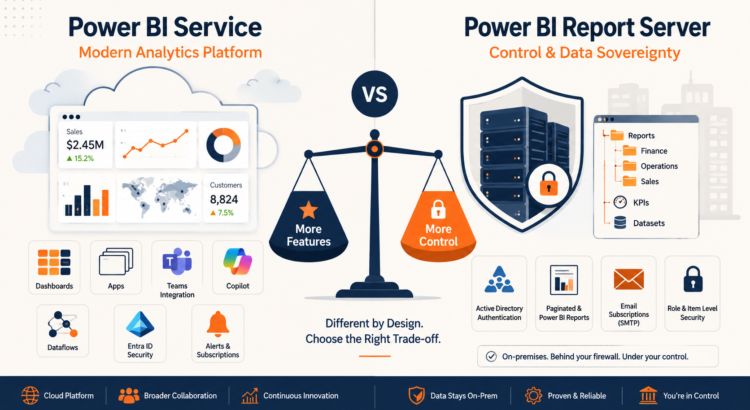
No, no. The Power BI Service and Power BI Report Server share a name, a desktop authoring tool, and a visual engine, and almost nothing else. If you are deciding between Power BI Services and Power BI Report Server, you need to understand that Report Server is not “Power BI, it is on-premises”. This is a much narrower product, more akin to SQL Server Reporting Services with Power BI reports included.
In short, Power BI Service is a cloud platform that includes dashboards, applications, data flows, and a complete Fabric roadmap. Power BI Report Server is an on-premises reporting portal that hosts Power BI and paginated reports, no dashboards, no applications, and a much simpler refresh and security model.
For some organizations, Report Server is still the right answer. But you have to choose it with your eyes open. This is where the two products differ, in the areas that are most difficult to implement in real projects: dashboards, data refresh, security, applications and report distribution.
Dashboard: Report Server does not have one
This is what surprises many people the most. In Power BI Services, dashboards are different objects: single-page canvases where you embed tiles from multiple reports and data sets, set data alerts, and provide executives with a single screen that summarizes the state.
Power BI Report Server has no dashboards at all. No embedding, no tiles, no alerts, no Q&A natural language tiles. What you get is a web portal: a folder structure containing Power BI reports, paginated reports, and KPIs.
In practice, teams work around this by creating “landing” report pages that mimic dashboards, with drill-downs or links to details. This works, but it’s a design pattern you have to build and maintain yourself, not a feature. If your stakeholders have seen the Service and expect the dashboard to contain alerts, set those expectations early, preferably before the procurement decision, not after.
Data refresh: capable, but a different world
In Services, refresh is a platform capability. Import model refreshes on a schedule (eight times a day in Pro, capacity 48 times a day), you have incremental refreshes, data streams for reusable ETL, and a local data gateway that bridges the cloud to on-premises sources. Refresh failures are emailed to you, and refresh history is visible per data set.
Report Server handles refreshing through scheduled refresh plan determined per report in the web portal, which the server runs self. Since it’s all within your network, there are no gateways to configure, and you’re also not bound by the Pro’s limit of eight per day. You can schedule it as aggressively as your server and sources can tolerate. That’s a real plus for the local version.
The advantages: no data flow, no incremental refreshes as users of the Service know, and stored credentials to manage for each data source. Direct connections to Analysis Services remain the strongest pattern in Report Server. Let the model do its work and skip refreshing the import if you can.
Security: Login ID versus Active Directory
This service is built on Microsoft Entra ID. It delivers conditional access, MFA, B2B guest sharing, sensitivity labels via Microsoft Purview, and row-level security applied per user across reports, applications, and APIs. Security is identity-driven and content-aligned.
Reports Server uses Windows authentication against your Active Directory, with role-based, item-level, and folder-level permissions — exactly the model SSRS administrators have run with for two decades. Row-level security is supported in Power BI reports in Report Server, which has caught some people’s attention (in a good way), but you won’t get sensitivity labels, conditional access policies, or easy external sharing.
Here’s the commercial point: if your reason for choosing Report Server is data sovereignty or regulatory control, an AD model may be a better fit for you — all while staying within the constraints you’ve set. If your organization is hybrid and moving towards the cloud, you are building reporting security on a model that you want to retire.
Application: Service only
Apps are the Service’s packaging and distribution mechanism: building reports and dashboards from workspaces, publishing them as a single branded app, controlling audiences, and pushing updates without touching individual permissions. For any deployment beyond a handful of users, apps are how Power BI scales.
Report Server has no equivalent. A distribution is a hierarchy of folders in a web portal, secured by item and folder permissions. This is useful — again, an SSRS store would feel right at home — but there’s no concept of curated and versioned content bundles, no app audiences, and no separation between “what the author sees” and “what the consumer sees” outside of the security of the folder. Governance discipline must come from you, not the platform.
Report distribution: portals and email versus everything else
These services give you apps, live sharing, embedding in Teams and SharePoint, custom apps, email subscriptions, exporting APIs, and, increasingly, Copilot-based consumption. Content meets users where they work.
Reports Server provides a web portal, URL access, basic embedding via iframes, and email subscriptions, which require you to set up and maintain an SMTP configuration on the server. Paginated report subscriptions are mature and reliable; they have been the workhorses of operational reporting for years. But there’s no Teams integration, no mobile-friendly app distribution other than the Power BI mobile app directed to your server, and every distribution channel is something your team operates.
How to decide
Choose Power BI Report Server when the data absolutely cannot be stored in the cloud. You know because of sovereignty, regulation, disconnected environments, and you can live with reports-plus-folders compared to modern BI platforms. Choose Power BI Services for everything else, because that’s where every Microsoft investment goes: Fabric, Copilot, data flow, deployment flow. If you choose Power BI Report Server, choose it as an intentional trade-off of capability for control, and not because you assume it’s the same product without a subscription.
Need help making a call?
I’ve spent twenty years helping organizations get Microsoft data platform decisions right the first time, including many who are considering exactly this question. If you are evaluating Power BI Services against Power BI Report Server, or planning a migration from one service to another, then my Power BI consulting and training can save you from learning the differences the expensive way. Contact us, and we’ll talk about it.
PakarPBN
A Private Blog Network (PBN) is a collection of websites that are controlled by a single individual or organization and used primarily to build backlinks to a “money site” in order to influence its ranking in search engines such as Google. The core idea behind a PBN is based on the importance of backlinks in Google’s ranking algorithm. Since Google views backlinks as signals of authority and trust, some website owners attempt to artificially create these signals through a controlled network of sites.
In a typical PBN setup, the owner acquires expired or aged domains that already have existing authority, backlinks, and history. These domains are rebuilt with new content and hosted separately, often using different IP addresses, hosting providers, themes, and ownership details to make them appear unrelated. Within the content published on these sites, links are strategically placed that point to the main website the owner wants to rank higher. By doing this, the owner attempts to pass link equity (also known as “link juice”) from the PBN sites to the target website.
The purpose of a PBN is to give the impression that the target website is naturally earning links from multiple independent sources. If done effectively, this can temporarily improve keyword rankings, increase organic visibility, and drive more traffic from search results.